ASP.NET Core, weeks 7–12
The deepest module in the course, documented in full: how six weeks get from a first C# class to a deployed, authenticated, relational web app.
6 weeks · 13 units · 15 learners
01 · Learners & context
This module ran as weeks 7–12 of the 14-week course I designed and taught for Workforce Opportunity Services in 2025. By week 7 the cohort had a week of JavaScript, two weeks of HTML, CSS, and accessibility, a week of relational database design, and two weeks of React behind them.
ASP.NET Core is where those pieces meet, and it's the longest module by far: about twice the material of the React module and four times most of the others.
WOS screened more than a thousand applicants for fifteen seats, all training for one hiring partner. The learners were in their twenties and thirties. Most had taught themselves some code, three had computer science degrees, and one had been through a coding bootcamp. So every lesson had to make sense to someone who'd learned from tutorials and still be worth the time of a CS graduate.
The course was full-time and mostly remote. I taught on site in Farmers Branch, Texas, three times: the opening sessions, the first days of .NET, and the capstone presentations.
02 · The six-week arc
The module builds one layer at a time, and each week's app uses everything before it. Every unit has one measurable objective, and each one is tagged with where it's assessed.
Tag keyRubric categoryAssignment or capstone
- Week 7
C# Fundamentals
Write C# console programs that transform data using typed variables, conditionals, loops, lists, dictionaries, and methods.
OOP in C#
Model a domain as classes with constructors, properties, and access modifiers, then extend it with inheritance, an abstract class, and an interface.
- Week 8
MVC Fundamentals
Route requests to controller actions, render strongly typed Razor views, and accept form input through model binding with data-annotation validation.
- Week 9
LINQ and APIs
Filter, sort, aggregate, and project data with LINQ, and expose it through a REST API with GET, POST, PUT, and DELETE endpoints backed by MySQL.
- Week 10
- week 10 is crunch time, like the run-up to a launch
Full CRUD
Build create, read, update, and delete for one entity with GET/POST action pairs and Razor forms, persisted through EF Core.
Session Auth
Implement registration, login, and logout with bcrypt-hashed passwords and session state, and block logged-out users from protected routes.
One-to-Many
Model a one-to-many relationship in EF Core, apply it with a migration, and save records owned by the logged-in user.
Many-to-Many
Model a many-to-many relationship through a join entity, and display related data such as counts and averages with Include, ThenInclude, and ViewModels.
- Week 11
Best Practices
Use async actions, a consistent data-loading pattern, and custom error pages and logging; allow edits and deletes only when the record's foreign key matches the logged-in user.
- Practice assessment, then the graded assessment → the rubric
Agile
Write user stories with acceptance criteria, prioritize a one-week MVP backlog, and run it on a Kanban board with WIP limits.
- Week 12
Capstone
As a team, scope a full-stack MVP in a PRD, build it in six days, and present it on Demo Day.
Polish
Link every board card to a pull request, resolve merge conflicts, and write a README a stranger can run the app from.
Deploy
Deploy the app and its MySQL database to Azure over an SSL-secured connection.
Two apps come back from the SQL module, where students designed the databases for The Rewind and The Groan Zone from wireframes. Here they build them as full-stack apps. The schema thinking is already done, so the effort goes into the new material.
03 · Assessment
The module uses the same assessment design as every assessed module: a guide, a four-level rubric, a practice assessment taught together in class, then a graded version. The graded assessment is open-book, with no collaboration and no AI, and students get three attempts.
Every category has four levels, and a pass needs Proficient in every one.
ASP.NET Core assessment rubric
Exemplary (4)Above the bar
- Database & Models
- All models and their relationships are correctly designed and implemented. Migrations are used correctly. Models have appropriate data types and data annotations.
- Authentication & Authorization
- User registration, login, and logout are fully functional and bug-free. Authorization checks (for Update/Delete operations) are correctly implemented using the foreign key.
- CRUD Functionality
- All CRUD operations (Create, Read, Update, Delete) are fully functional and bug-free. All routes and forms work as expected.
- Data Retrieval & Display
- All data, including nested and related data (e.g., average ratings), is retrieved and displayed correctly. ViewModels are used appropriately to shape data for the views.
- Form Validation
- All forms use data annotations to validate user input. Error messages are displayed correctly, and invalid form submissions are prevented.
- Code Quality & Best Practices
- The application of professional best practices is outstanding. Code is clean, well-organized, and follows conventions. Asynchronous methods, a consistent data-loading pattern, and robust error handling are used.
Developing (2)Below the bar
- Database & Models
- Significant issues in model design or relationships exist, or migrations are not used correctly.
- Authentication & Authorization
- Authentication functionality is incomplete or has significant bugs. Authorization checks are missing or non-functional.
- CRUD Functionality
- CRUD functionality is incomplete, or one or more operations have significant bugs or are non-functional.
- Data Retrieval & Display
- Significant issues with data retrieval or displaying related data exist. ViewModels are used inconsistently or incorrectly.
- Form Validation
- Form validation is incomplete or has significant bugs. The application may be vulnerable to invalid data.
- Code Quality & Best Practices
- Attempts to apply best practices are evident, but significant violations exist. Code structure might be messy or monolithic.
Beginning (1)Below the bar
- Database & Models
- Models and relationships are fundamentally flawed or non-functional.
- Authentication & Authorization
- No authentication or authorization is present.
- CRUD Functionality
- CRUD operations are missing or do not work.
- Data Retrieval & Display
- Data is not being retrieved or displayed correctly. ViewModels are not used.
- Form Validation
- Form validation is missing or non-functional.
- Code Quality & Best Practices
- Best practices are largely missing or misunderstood. The code is chaotic and unreadable.
| Category | Exemplary (4) | Proficient (3) | Developing (2) | Beginning (1) |
|---|---|---|---|---|
| Database & Models | All models and their relationships are correctly designed and implemented. Migrations are used correctly. Models have appropriate data types and data annotations. | All models and relationships are correctly designed, but minor issues with migrations or data annotations exist. | Significant issues in model design or relationships exist, or migrations are not used correctly. | Models and relationships are fundamentally flawed or non-functional. |
| Authentication & Authorization | User registration, login, and logout are fully functional and bug-free. Authorization checks (for Update/Delete operations) are correctly implemented using the foreign key. | Authentication functionality is present and mostly works correctly. Authorization checks are attempted but may have minor bugs or security vulnerabilities. | Authentication functionality is incomplete or has significant bugs. Authorization checks are missing or non-functional. | No authentication or authorization is present. |
| CRUD Functionality | All CRUD operations (Create, Read, Update, Delete) are fully functional and bug-free. All routes and forms work as expected. | All CRUD operations are present and functional, but minor bugs or inconsistencies exist (e.g., an update form that fails to populate correctly). | CRUD functionality is incomplete, or one or more operations have significant bugs or are non-functional. | CRUD operations are missing or do not work. |
| Data Retrieval & Display | All data, including nested and related data (e.g., average ratings), is retrieved and displayed correctly. ViewModels are used appropriately to shape data for the views. | Data retrieval and display are mostly correct, but some issues exist with displaying related data or with the use of ViewModels. | Significant issues with data retrieval or displaying related data exist. ViewModels are used inconsistently or incorrectly. | Data is not being retrieved or displayed correctly. ViewModels are not used. |
| Form Validation | All forms use data annotations to validate user input. Error messages are displayed correctly, and invalid form submissions are prevented. | Form validation is mostly present and functional, but minor bugs exist in error display or form submission prevention. | Form validation is incomplete or has significant bugs. The application may be vulnerable to invalid data. | Form validation is missing or non-functional. |
| Code Quality & Best Practices | The application of professional best practices is outstanding. Code is clean, well-organized, and follows conventions. Asynchronous methods, a consistent data-loading pattern, and robust error handling are used. | Best practices (asynchronous methods, data loading, error handling, etc.) are correctly applied. Code is generally clean and understandable. | Attempts to apply best practices are evident, but significant violations exist. Code structure might be messy or monolithic. | Best practices are largely missing or misunderstood. The code is chaotic and unreadable. |
To pass: 18/24 points (75%) or higher, with at least Proficient (3 points) in every category.
04 · The capstone
A one-week team sprint run like a real Agile project: a PRD on Monday, Trello with WIP limits, daily stand-ups, a demo script, and a retro.
The groundwork starts a week earlier. Alongside the graded assessment, I introduce Agile, sprints, and morning stand-ups, and students who pass early can start building.
The requirements sort features into must, should, nice-to-have, and out of scope. Each team also earns the Explorer's Badge by adding one technique the course never taught.
Capstone playbook (PDF)05 · Sample lesson
Week 8, Day 1: the first lesson of the MVC Fundamentals unit, and the first day students build websites in C#. They arrive with a week of C# and OOP behind them, plus React and SQL from earlier modules. This lesson is the map before the code: three parts, one diagram, and one request traced from the browser and back.
Most lessons follow one template: a Goal, an intro, concept sections, a Summary, and "Your Turn" practice suggestions or a "What's Next" teaser. Build lessons later in the module swap the concept sections and practice for numbered steps.
What is MVC?
Welcome to Week 2! We're now shifting our focus from core C# programming to building web applications using ASP.NET Core MVC. This is where your front-end (HTML, CSS, JavaScript, React) and back-end (C#, SQL, OOP) knowledge will start to converge. The Model-View-Controller (MVC) architectural pattern is fundamental to how many web applications are structured, and understanding it is key to building robust and maintainable web solutions.
Goal
By the end of this lesson, we will be able to:
- Define the Model-View-Controller (MVC) architectural pattern.
- Understand the distinct responsibilities of the Model, View, and Controller components.
- Explain how these three components interact to handle a web request and generate a response.
- Recognize the benefits of using the MVC pattern in web development.
What is MVC?
MVC stands for Model-View-Controller. It's an architectural pattern that separates an application into three main logical components:
- Model
- View
- Controller
The primary goal of MVC is to achieve a separation of concerns. This means dividing the application into distinct parts, each responsible for a specific aspect of the application's functionality. This separation makes applications easier to develop, test, and maintain, especially as they grow in complexity.
The Three Components Explained
Let's break down each component:
1. The Model
The Model represents the application's data, business logic, and rules. It's the "brain" of the application, independent of the user interface.
- Data: The Model holds the data that the application operates on. This data might come from a database, an API, or simply be in-memory objects.
- Business Logic: It contains the rules and operations that govern how the data is created, stored, and changed. For example, in an e-commerce application, the Model would handle calculating product prices, managing inventory, or processing orders.
- State Management: It manages the state of the application's data.
Think of it as: The "what" of the application – the core information and the rules that define it.
Examples in a .NET MVC Application:
- C# classes that represent entities (e.g.,
Product,User,Order). - Logic for interacting with a database (e.g., retrieving products, saving user data).
- Validation rules for data.
2. The View
The View is responsible for presenting the data to the user. It's the user interface (UI) of the application. The View receives data from the Controller and displays it in a format that the user can understand (e.g., HTML, CSS, JavaScript).
- Presentation Layer: It's concerned solely with how the data looks. It doesn't contain business logic.
- Passive Role: The View typically doesn't directly interact with the Model; it receives the data it needs from the Controller.
Think of it as: The "how it looks" – the visual representation of the data. You've already built many Views with HTML, CSS, and JavaScript, and even more complex ones with React!
Examples in a .NET MVC Application:
- Razor Views (
.cshtmlfiles): These are HTML files embedded with C# code that the server processes to generate dynamic HTML. - Client-side JavaScript or CSS that enhances the UI.
3. The Controller
The Controller acts as the intermediary or "traffic cop" between the Model and the View. It receives user input, processes requests, interacts with the Model, and selects the appropriate View to display the response.
- Handles User Input: It listens for user actions (e.g., clicking a button, submitting a form, navigating to a URL).
- Orchestrates Flow: It determines what action needs to be taken based on the user's request.
- Interacts with Model: It retrieves data from or sends data to the Model based on the request.
- Selects View: After processing, it chooses which View should be displayed and passes any necessary data to that View.
Think of it as: The "how it works" – the component that handles user interaction and orchestrates the application's response.
Examples in a .NET MVC Application:
- C# classes that inherit from
Controller(e.g.,HomeController,ProductsController). - Methods within these classes (called Action Methods) that respond to specific URL requests.
How MVC Components Interact (The Request-Response Flow)
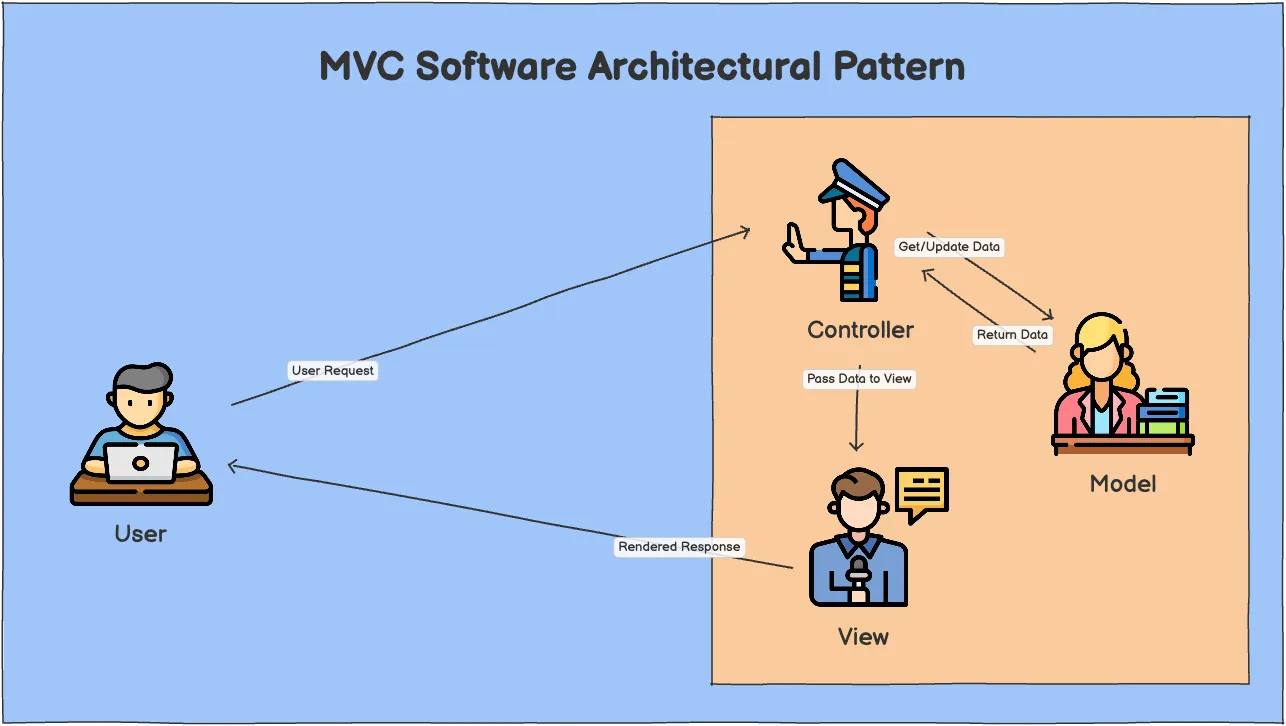
Let's trace a typical web request through an MVC application:
- User Request: A user makes a request (e.g., types a URL in the browser, clicks a link, submits a form).
- Controller Receives Request: The web server (IIS, Kestrel) receives the request and, based on routing rules, directs it to the appropriate Controller and its Action Method.
- Controller Interacts with Model: The Controller's Action Method determines what data is needed. It then interacts with the Model to retrieve, update, or process data.
- Model Processes Data: The Model performs the necessary business logic and returns the requested data to the Controller.
- Controller Selects View: The Controller receives the data from the Model. It then selects the appropriate View to display this data.
- View Renders Response: The Controller passes the data to the View. The View uses this data to generate the final HTML (or other content) that will be sent back to the user.
- Response Sent to User: The generated HTML is sent back to the user's browser, which renders the page.
Benefits of the MVC Pattern
- Separation of Concerns: This is the biggest advantage. Each component has a clear, distinct responsibility, making the code easier to understand, manage, and test.
- Testability: Because components are separated, they can be tested independently. For example, the Model's business logic can be tested without needing a UI.
- Maintainability: Changes in one component (e.g., changing the UI in the View) are less likely to break other components (e.g., the business logic in the Model).
- Scalability: The modular nature makes it easier to scale different parts of the application independently.
- Parallel Development: Different teams or developers can work on the Model, View, and Controller simultaneously.
- Flexibility: It's easier to swap out different technologies for each component (e.g., change the database technology in the Model, or switch front-end frameworks in the View).
Summary
- MVC (Model-View-Controller) is an architectural pattern that separates an application into three distinct components to achieve separation of concerns.
- The Model manages application data and business logic.
- The View is the user interface, responsible for presenting data.
- The Controller handles user input, orchestrates interactions between the Model and View, and selects the appropriate response.
- MVC promotes modularity, testability, maintainability, and flexibility in web application development.
What's Next?
Now that we understand the theory behind MVC, we'll immediately jump into creating our first ASP.NET Core MVC application and see these concepts come to life!
See it taught
The same page, live on the first morning. I walk the diagram, then cast the three parts: a traffic cop, a librarian, and a newscaster.
Read the transcript
We're beginning our second week of the C# .NET module, and we're going to learn about creating MVC applications today. So, first day creating actual websites. So, that's exciting. Today will be spent just on routing. How do we handle different routes with our controllers? But before we dive into any of that, let's just get a handle on what the MVC architecture is. So, let me share my screen here.
Those are the three main layers here: model, view, and controller. A little bit further down, we have a diagram. Here's our user here on the left. The user makes a request. The request gets handled by the controller. The controller interacts with the model. Maybe we have to get some data from the model, from the database. The model will return that data back to the controller. The controller decides which view to return. And here's our little newscaster presenting our data. Our view then renders the response back to the user.
So we have our traffic cop as the controller, our librarian for the model, and our newscaster for the view. And that is our MVC software architectural pattern.
06 · What I'd change
The lesson goals said things like "Understand the distinct responsibilities of the Model, View, and Controller," from the sample above. You can't measure "understand." I wrote the unit objectives above after the course ran, working back from what the rubric actually assessed. Next time the objectives come first, and every lesson goal names something a student can do.
Hiring for curriculum design?
Take the rubric and the capstone playbook with you. If you're hiring for curriculum design, instructional design, or technical teaching, I'd like to hear about the role.
← Back to the tracklist